Microsoft Teams doesn’t log you out?
Important notices:
- This article does not exploit any vulnerability in MS Teams, since Microsoft itself considers the issue described here not to be a bug.
- The content is for educational purposes only. Use it to understand how to keep your account secure.
- Do not use the information here to gain unauthorized access to accounts you are not authorized to access.
- The opinions expressed here are my own and do not represent any employer I have worked for, work for now, or will work for in the future.
Contents
- 1. Background
- 2. How is the user session identified?
- 3. Access persists after the user logs out
- 4. Missing secure cookie flags make things worse
- 5. Breaking other pillars of security
- 6. Inconsistent behavior
- 7. Attack scenarios: XSS, phishing, malware, or a compromised shared environment
- 8. Microsoft’s response
- 9. Recommendations and references
- 10. Conclusions
- 11. Video summary
1. Background
In this article I will show how the Microsoft Teams communication app identifies a user’s session, what the messages it exchanges look like, and the risks of the approach Microsoft has implemented.
Here I demonstrate improper behavior in how the app ends the user’s authenticated session. I reported this behavior to Microsoft in March 2021, 5 months before publishing this material.
Microsoft itself does not consider this a problem that needs to be addressed or prioritized, so disclosing this information violates no ethical principle. The goal is to inform users so they can mitigate potential compromises of their own accounts.
2. How is the user session identified?
There are two main ways to use Teams:
- In the browser, as a web app. (And it isn’t even truly multi-browser, since it doesn’t work in Firefox.)
- With the desktop app you install.
Both work the same way. The desktop app is just a “shell with an embedded browser“: the same web application that runs in the browser runs inside the desktop app. So everything described here applies to both.
If you browse the system’s cookies (in the dev tools), you’ll see the application uses a whole series of cookies. Among them there is one, and only one, that controls the session: “skypetoken_asm“.

Notice that Teams has a session-control cookie named after a different app: Skype. I’d venture to say Teams is a patchwork of reused legacy code, which would explain its poor quality and performance.
Either way, we can prove this is the only thing tying a request to a session. If we capture the chat message request and replay it from a standalone client (Postman, for example) including only the skypetoken_asm, the message is sent successfully on behalf of the session’s user.
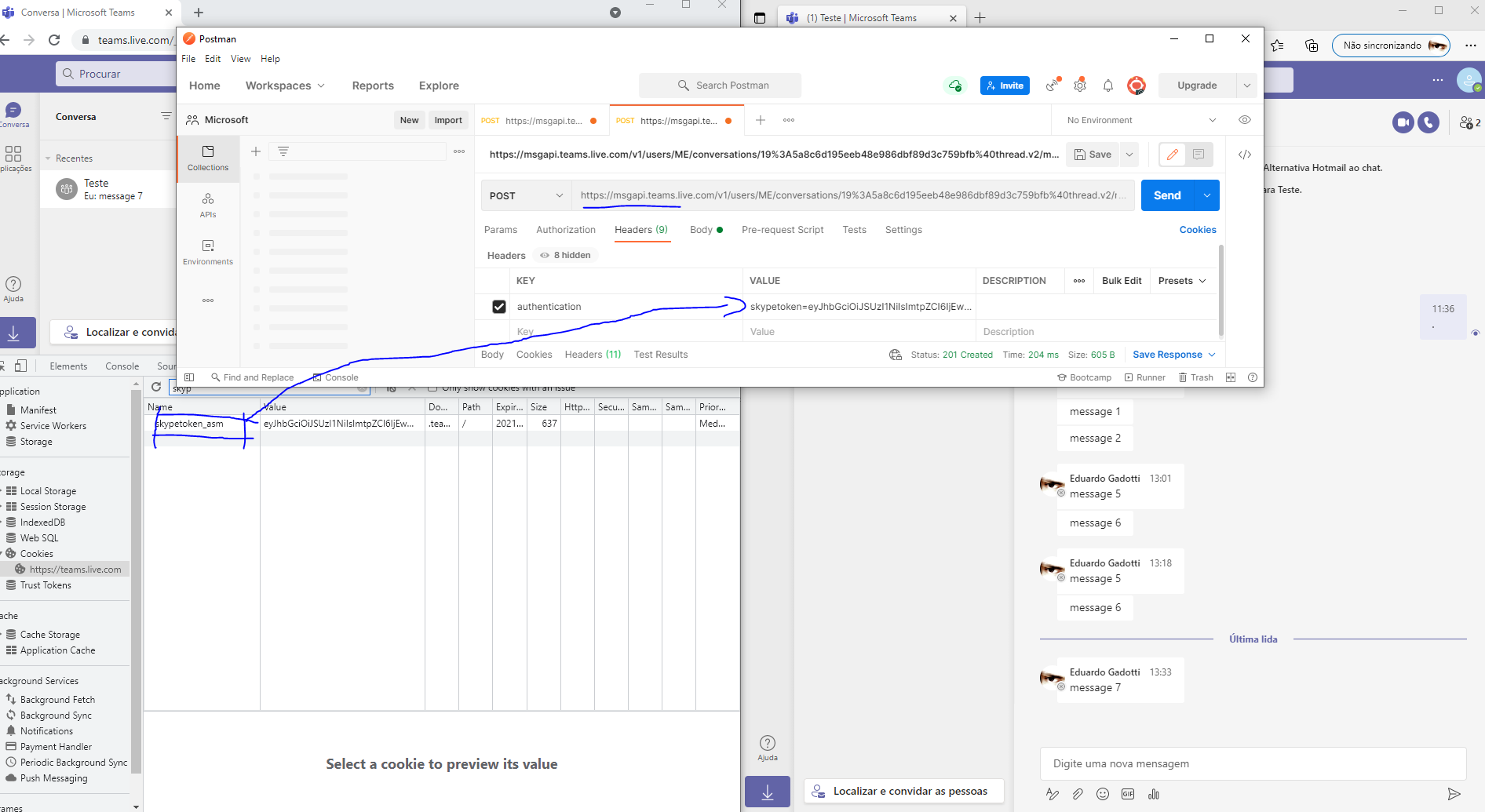
With this setup in place, we can now send or edit messages outside the Teams app, authentically and in isolation. I’ll use this environment for the observations that follow.
3. Access persists after the user logs out
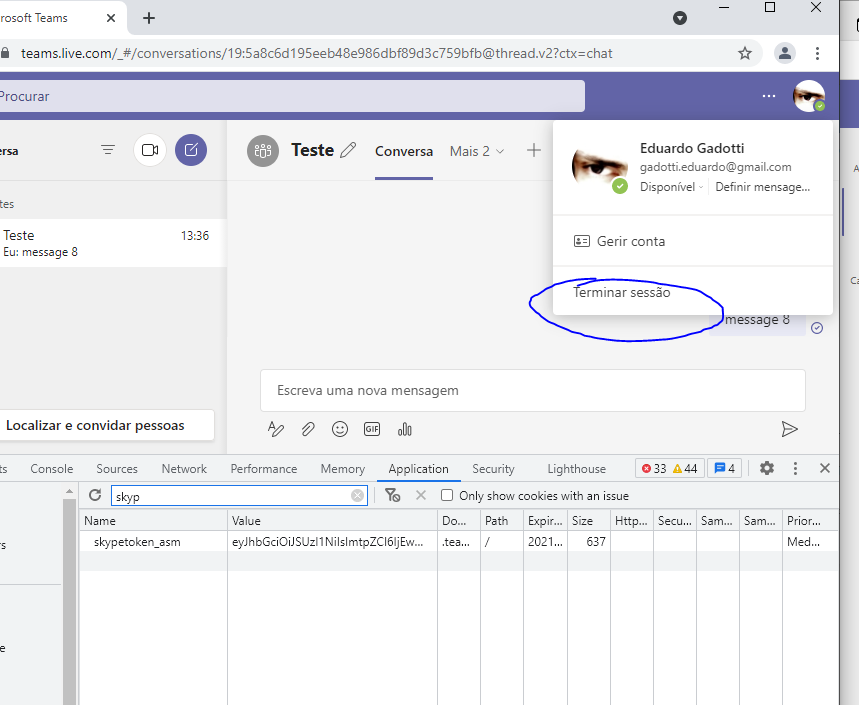
This is where the real problem begins. After the user ends their session with the “Sign out“ button, you can keep the user’s access: you can keep sending new messages, editing messages, and performing other operations the account allows. This happens because, even though the user explicitly asked to end the session, the session is not actually ended on Microsoft’s servers.
This is a common practice when authentication is confused with authorization. Teams login is “managed“ through an authorization, and there is no real authentication management. As a result, according to Microsoft’s own policy, the authorization that was obtained remains valid for the next 24 hours.
That means anyone who has captured the authorization token from the cookie can convincingly impersonate the user for at least 24 hours after the user explicitly asked to end that session.
The images below show the sequence. The session is ended, and then, using Postman, the message is sent again with the same session obtained earlier, and it succeeds.
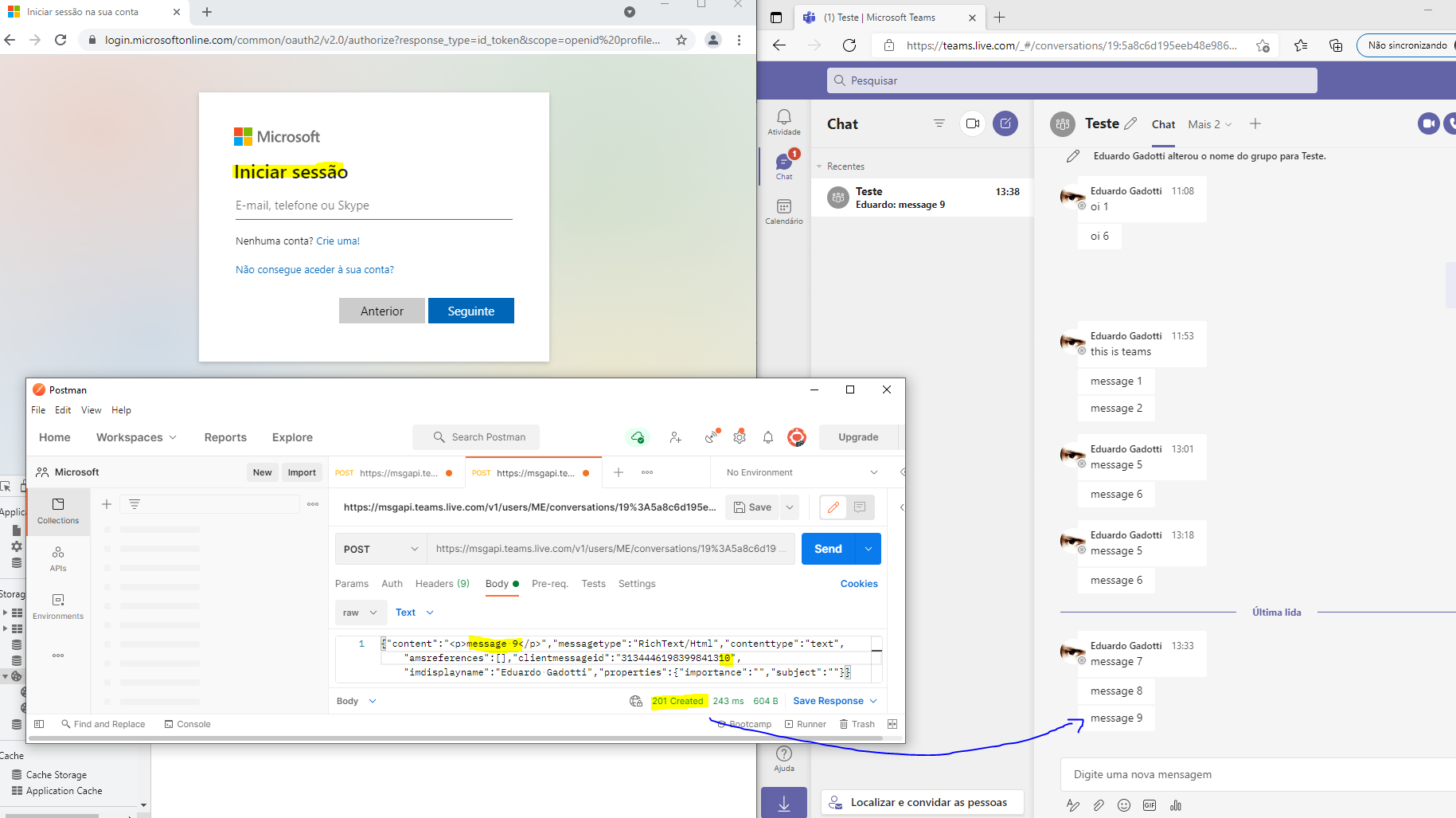
The consequences are pretty obvious.
4. Missing secure cookie flags make things worse
The situation gets worse because the cookie that stores the session (skypetoken_asm) lacks the minimum recommended security attributes: ‘secure‘, which prevents it from being sent over anything other than HTTPS, and ‘httpOnly‘, which prevents JavaScript code from reading the cookie’s value.

In practice, this means the cookie can be stolen by code running in the browser console. A few examples of how the missing ‘httpOnly‘ attribute makes this easier: tricking the user into clicking a malicious link, embedding the application in a frame and serving it from an attacker-controlled app, or exploiting an XSS (cross-site scripting) vulnerability that may be discovered in Teams.
The image below shows how to get the value using JavaScript.
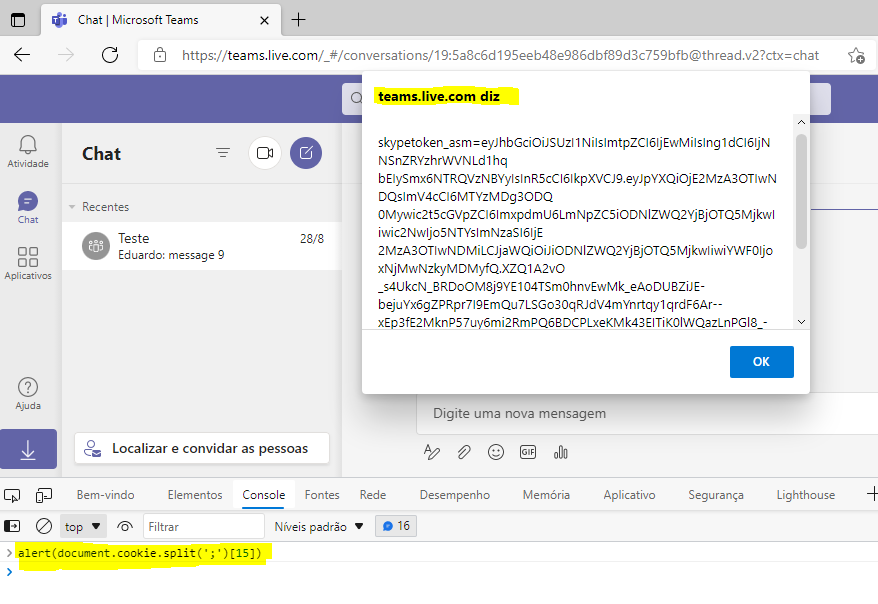
On top of that, the browser will send this sensitive value over unencrypted protocols, in the clear on the network if forced to, because ‘secure‘ isn’t enabled either. The cookie can therefore travel over HTTP (not just HTTPS).
5. Breaking other pillars of security
Besides the possible loss of authenticity, the situation also allows a breach of integrity, because you can edit messages that were already sent, not just send new ones.
Once the session is captured, as demonstrated, other operations become possible too, all while legitimately impersonating the user. Sending and editing messages are just examples.
6. Inconsistent behavior
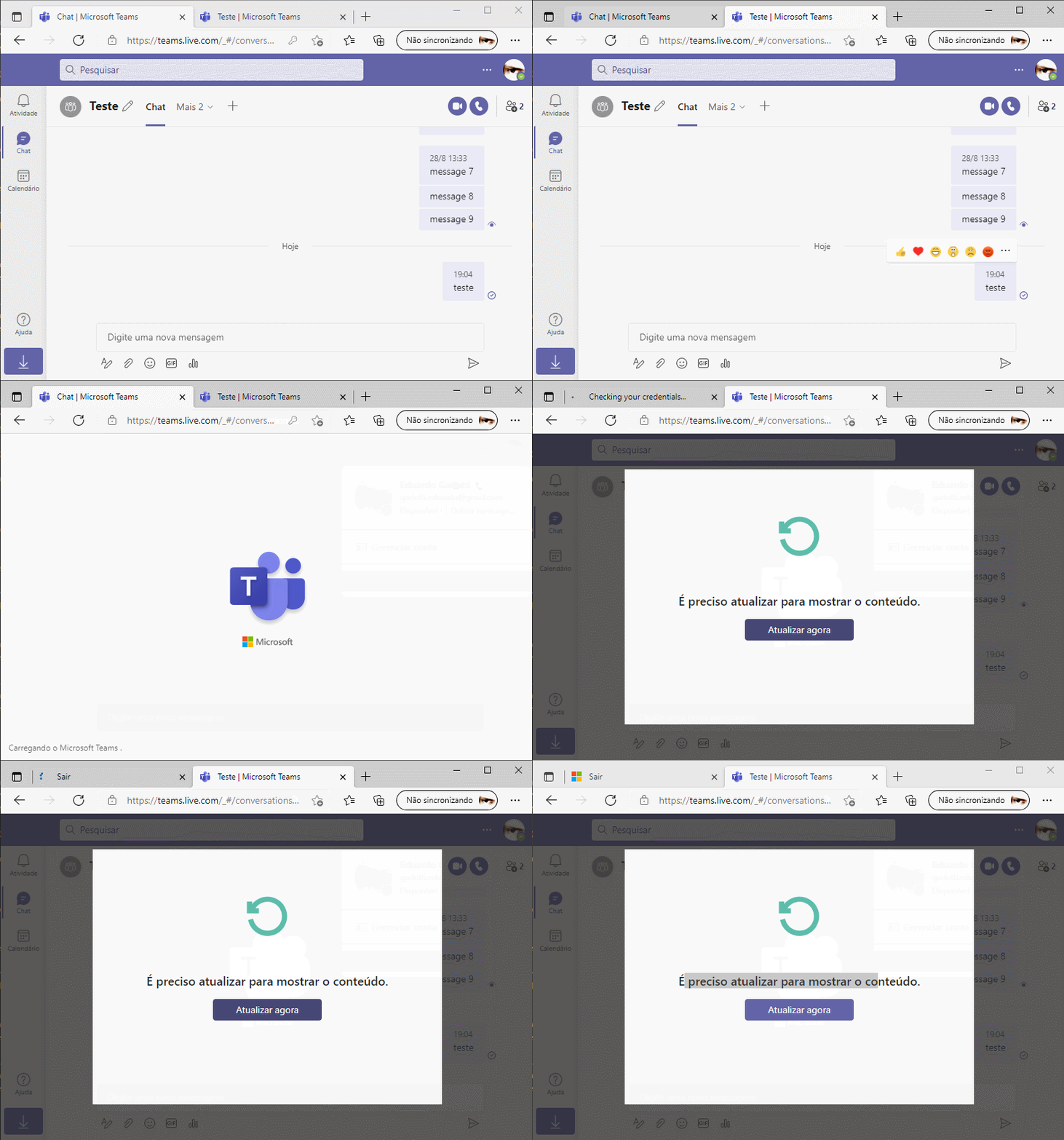
Here’s something curious. Try a test with other tabs of the application open: when you end the session in one tab, the other tabs log out automatically. That clearly shows the intent: when a user logs out, any other device connected through that same session should be disconnected immediately.
7. Attack scenarios: XSS, phishing, malware, or a compromised shared environment
As mentioned, one way to get the session cookie is by exploiting XSS (cross-site scripting), but it’s worth flagging other scenarios where this hijacking can happen, such as:
- phishing;
- social engineering;
- malware;
- sniffing.
Shared workstations, public computers, internet cafes, coworking spaces, and even using the internet over public networks (airports, coffee shops, etc.) are also scenarios where a session can be hijacked, mainly because of the missing attributes mentioned earlier.
8. Microsoft’s response
On my end, I made two attempts to report the issue to Microsoft. The first got a reply that was far too quick: the report was being closed, no “case number“ was even created, and I was told that this is simply how the application is supposed to work.
For the second attempt, I wrote a more complete report covering the possible attack scenarios and my concerns and, above all, technical backing with references from a variety of sources describing and proving that this behavior is a poor session management practice. This time the reply took much longer, the report got a “case number,” and it stayed under review for a while. But in the end, the answer was very close to the first one. They said they understand the situation but will keep it as is because they don’t consider it a security issue, and that if it’s reviewed in the future they may consider implementing this “improvement.” Then they closed the case.

It wouldn’t be the first time the company has dodged an issue, perhaps to avoid admitting to problems so it doesn’t have to release security patches or pay bounties.
9. Recommendations and references
The case is clear. OWASP, the leading source for these best practices, offers two relevant quotes:
“In order to close and invalidate the session on the server side, it is mandatory for the web application to take active actions when the session expires, or the user actively logs out, by using the functions and methods offered by the session management mechanisms”
And also:
“Logout Button: Web applications must provide a visible and easily accessible logout (logoff, exit, or close session) button that is available on the web application header or menu and reachable from every web application resource and page, so that the user can manually close the session at any time. As described in Session_Expiration section, the web application must invalidate the session at least on server side.”
Other references that cite and discuss best practices for application session management:
1. https://owasp.org/www-project-top-ten/2017/A2_2017-Broken_Authentication
2. https://cheatsheetseries.owasp.org/cheatsheets/Authentication_Cheat_Sheet.html
3. https://owasp.org/www-project-mobile-top-10/2014-risks/m9-improper-session-handling
4. https://owasp.org/www-project-web-security-testing-guide/latest/4-Web_Application_Security_Testing/06-Session_Management_Testing/06-Testing_for_Logout_Functionality.html
10. Conclusions
Based on references, best practices, and my experience as a security professional, I believe the way MS Teams handles session management and termination is inadequate. It widens the attack surface for motivated people looking to gain unauthorized access.
At a minimum, I would recommend implementing the following:
- A stronger session management method. For an application used and targeted worldwide, relying solely on a single token in a cookie to identify the user isn’t acceptable.
- Enable the minimum security attributes, so the cookie travels only over an encrypted protocol and can’t be read by JavaScript or any other front-end language (httpOnly and secure).
- Most importantly: invalidate the user’s session immediately when they ask to end it.
As MS Teams users, we can:
- Avoid using the app on public networks or public machines.
- Avoid using the app on other people’s computers.
- Hope for the best.
11. Video summary
A video where I walk through everything described here, in practice.