Cookies, web session management and security
This article is adapted from a talk I gave on October 29, 2019 about cookie security attributes in the context of user session management in a web application. The goal is to highlight why it matters to set cookie attributes correctly.
None of this is advanced material, but it’s still extremely important for understanding and getting the basics of information security right.
If you prefer, you can watch the talk on YouTube (in Portuguese): https://www.youtube.com/watch?v=XLG07IcNSFs
Contents
- Introduction
- Different uses of cookies
- Cookie attributes
- 1. HttpOnly
- 2. Secure
- 3. SameSite
- Security implications
- XSS
- RCE
- Conclusion
Introduction
Before we dive in, here are a few basic concepts that will come up throughout the article.
What are cookies?
Essentially, cookies are pieces of information that the sites we visit create and store in our browsers, and that the browser sends back to them as we keep using the site.
The flow starts when the server sends the information to the browser, which stores it as instructed. With every request, the browser automatically includes the cookies for that domain and returns the originally stored value to the server.
You can inspect them in your browser’s Developer Tools (F12), under the “Storage” tab or its equivalent.
What is a session?
In this context, a “session” is a temporary record the server keeps, which can hold the identifier of a specific user’s session. For example:
1 | 2r5b2c3loehdubuh0ppy2f50 ⇔ Eduardo Gadotti |
In this case, the server maps that identifier to the user “Eduardo Gadotti”.
The record can live in memory, in a database or in files, and it is usually created after the user authenticates (username and password).
Different uses of cookies
Cookies can be, and are, used for all sorts of purposes: remembering the selected language, storing user preferences, tracking, and more. To keep things focused, I’ll concentrate on their use for user session control.
Since this value identifies the user, it is sensitive and has to be protected.
Session control can also be done in other ways, which are generally less secure:
- LocalStorage
- URL
- Hidden fields
Keep in mind that using cookies for session management isn’t insecure in itself. Using them incorrectly is what makes them insecure.
Cookie attributes
Cookies have three attributes you can configure, all of them aimed at security concerns:
- HttpOnly
- Secure
- SameSite
1. HttpOnly
When this attribute is enabled, code running in the browser can’t directly access the cookie’s contents. That means front-end JavaScript routines can’t read or collect the cookie’s value.
This mitigates the risk of malicious code injected into the application and running on the client side (XSS) hijacking users’ sessions.
In the next image, you can see that the ASP.NET_SessionId cookie, which had the httpOnly attribute enabled, couldn’t be read.
2. Secure
With this attribute on, you mitigate the risk of the cookie being intercepted over unencrypted traffic (HTTP) in a man-in-the-middle (MitM) attack. The cookie is neither sent nor received unless the request travels over HTTPS.
Put another way:
- HTTPS? The cookie is sent to the server over the internet
- HTTP? The cookie is not sent over the internet
So this attribute should only be enabled for systems that communicate over HTTPS, which is what you should be doing anyway.
3. SameSite
This attribute is closely tied to mitigating CSRF (Cross-Site Request Forgery) vulnerabilities.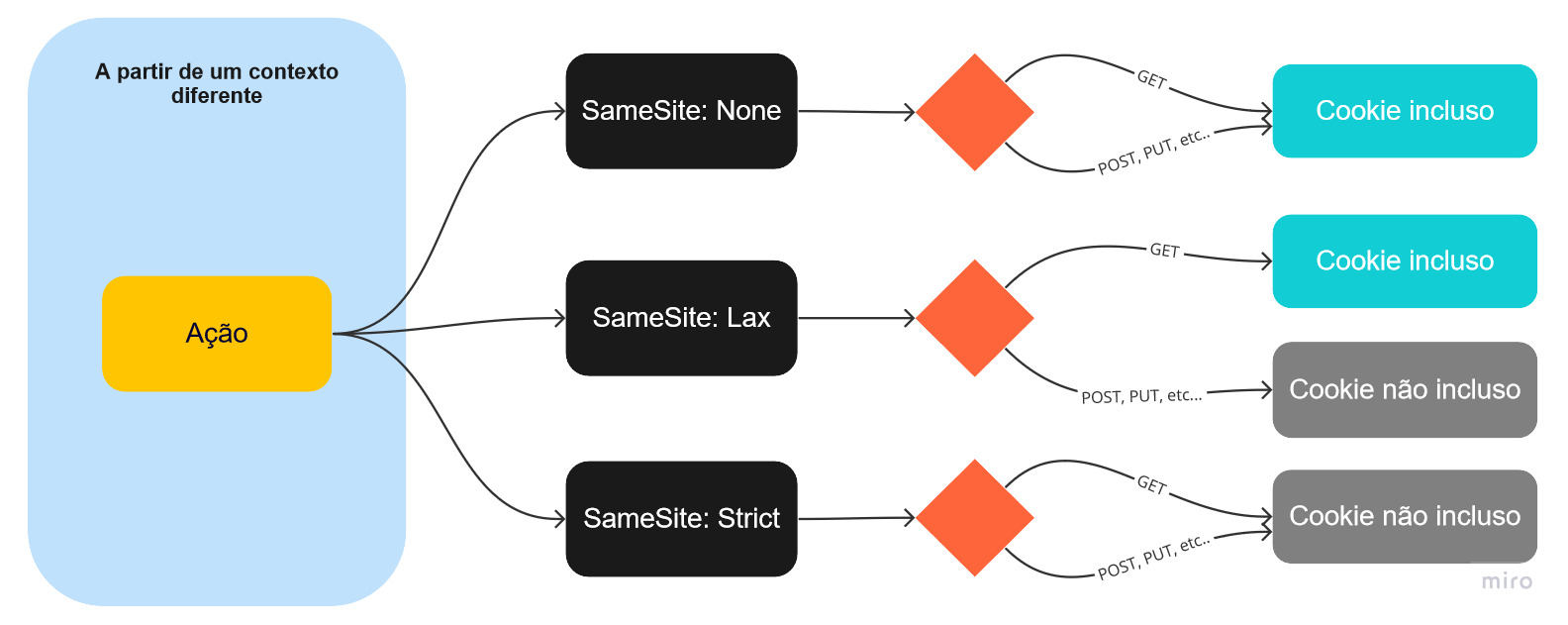
I explained in full how it works in an earlier article: https://eduardogadotti.com/en/2021/02/13/samesite-finally-understand-how-it-works/
Security implications
Enabling one or more of these attributes won’t solve every security problem, but it does reduce the attack surface. With that in mind, my recommendation is to always enable httpOnly and secure.
As for SameSite, the Strict value gives you the safest scenario, but it isn’t always possible given how the application is used. You need to assess the right setting for your case and add other controls where necessary.
Another important recommendation for session security is to issue a new session ID on every login. When someone lands on a login page, the system may already hand out a session ID that isn’t yet tied to any user. After a successful login, that session should be renewed, which, once again, helps prevent session hijacking through a variety of techniques.
XSS
XSS exploitation is the main vector for stealing cookie values, which is why enabling httpOnly, for example, matters so much. XSS vulnerabilities turn up in practically every system, and it is rare to find a web system that is completely bulletproof against them.
There are also cases where XSS is exploited by injecting a value into the cookies themselves. This can happen when the server-side application uses that value to perform another operation or to render a message on the page. Which brings us to the next topic.
RCE
In rarer cases, injecting values into cookies can lead to Remote Code Execution (RCE). This shows up in some PHP application scenarios where the cookie value is used to create a folder on the server to store files or data related to that session.
For example:
1 | MKDIR rrvqzonj5dlwjfshutellxqn |
would become vulnerable to the injection “; FORMAT C:/“:
1 | MKDIR rrvqzonj5dlwjfshutellxqn; FORMAT C:/ |
Conclusion
We need to pay attention to the cookie attributes available to us and manage them correctly. It’s easy to underestimate their importance, or to trust too much in what we assume is impossible, and fall into the trap of “we don’t know what we don’t know.“
My advice is not to bank on our own lack of imagination about how these attacks could be pulled off.
Also, always keep in mind that the session ID is what identifies the user, so it has to be protected.
A few more quick recommendations of mine:
- Don’t store the session ID, at least not without protection.
- Don’t pass it in URLs: they end up in server logs, which are less protected. Be careful with GET requests and consider POST.
- Don’t log the raw value on the server. If you need it for comparison and tracing, log a hash instead.