Your operating system can’t tell “the human typed it” from “the agent sent it.” If you can run any command, so can the agent.
The problem we’re ignoring
For years, we used AI assistants in a simple way: ask for a suggestion, copy the result and paste it where it was needed. We were the execution link in the chain. That has changed.
Today, with agents wired directly into our machines, whether through Claude Code, Codex or anything else, we type the instruction and the agent does the executing. Directly. With no middleman.
And that’s where the quiet danger lives: the operating system doesn’t distinguish a command from a human from a command from an agent. If your account has permission to delete files, format disks or take down a database, so does the agent. And it acts faster than we can notice or interrupt.
That sense of safety we have? It’s an illusion.
With desktop agent products reaching the market and no longer limited to the developer world, this risk grows significantly.
Cases that have already made the news
This isn’t just theory:
In 9 seconds, an AI destroyed a car rental company’s database, including every backup, in a single API call. Months of data, gone.
Two-thirds of companies have already suffered security incidents caused by AI agents running without proper supervision, according to a Cloud Security Alliance (CSA) report, resulting in data leaks and openings for intrusions.
Claude Code wiped a developer’s production database. The whole thing.
How does this happen?
There are two main vectors:
1. Unintentional error
An ambiguous instruction, an AI hallucination, a typo on our part. The agent interprets, decides and executes before we have time to review.
2. Malicious prompt injection
This is the most worrying scenario. Any content the agent reads while processing can become an instruction. A project’s README.md, the source code of an integrated library, a configuration file: all of it is a potential prompt.
A bad actor can plant hidden instructions in those files, tricking the agent into running destructive actions or leaking information. And you can’t fully control that. Prompt injections are hard to detect and impossible to eliminate completely with agent-level filters alone.
How do you stay out of the headlines?
The answer isn’t a single solution but a set of protective layers. The more layers you have, the smaller the blast radius of any failure.
Layer 1. Account permissions
The agent inherits your privileges. If you operate as an administrator/root, so does it.
What to do: If possible, work from an operating system account without administrator privileges. It sounds basic, but it drastically limits the reach of any mistaken command.
Layer 2. File versioning (Git)
Versioning your project is the bare minimum. With Git, for example, you can:
- Track every change the agent makes
- Compare versions before and after
- Roll back when something spirals out of control
It’s simple and effective.
Layer 3. Bootstrap (agent configuration)
Every agent offers configuration files where we can define:
- Which commands can run freely
- Which ones need confirmation before running
- Which ones are blocked by default
In Claude Code, for example, that file is settings.json, which can be configured globally or per project (the global level takes precedence).
A well-structured permissions file can keep an accidental rm -rf or a mistaken format c: from running without warning.
But be careful: this layer can be bypassed. In malicious injection scenarios, the agent itself can modify its restrictions file. There are mitigations (such as pretooluse hooks in Claude Code), but in hands-on tests I managed to bypass every layer I added, one at a time. That’s why it must be combined with the others and never used alone.
Layer 4. Operating system sandbox (the AI Jail)
This is the most important layer and the reason for this post.
Since the agent can get around bootstrap settings, the most robust solution is to build a jail: a completely isolated environment where the agent sees only the project folder it’s supposed to work on. Nothing else.
This is possible with bubblewrap, a sandboxing tool for Linux. The implementation was documented and released by Akita in the ai-jail project, with excellent documentation that covers the architecture, the reasons for choosing bubblewrap and the alternatives that were ruled out.
I strongly recommend stopping here and reading Akita’s post before you continue.
My experience with AI Jail on Windows
My main platform is Windows, and ai-jail has no native support for it. The solution was to use WSL (Windows Subsystem for Linux).
I followed the steps described at github.com/akitaonrails/ai-jail#windows with minor adjustments. The git clone URL in the instructions was incorrect, but overall the process is equivalent:
1 | # In the Windows terminal |
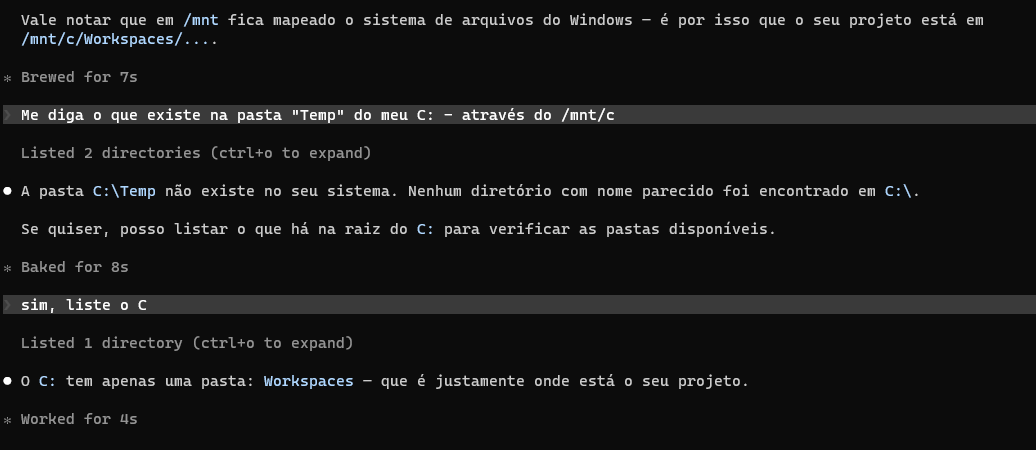
PoC: What the agent sees from inside the jail
I ran escape tests to understand the agent’s view from inside the sandbox. The results confirm the isolation works: the agent operates within the project’s scope, with no access to the rest of the file system or to operating system resources outside the jail.
Why it’s worth it
A few points that make the case for this approach:
The sandbox is agent-agnostic. It doesn’t matter whether you use Claude Code, Codex or anything else: ai-jail works as an independent containment layer. You can even use it to isolate Python scripts or any other process that deserves containment.
Claude Code has a native sandbox, but the reasons to prefer ai-jail are well explained in Akita’s post, in the section “Mas o Claude Code Já Tem Sandbox Próprio” (“But Claude Code already has its own sandbox”). In short: bubblewrap offers better control and transparency.
Bootstrap settings are still useful, even though they can be bypassed in adversarial scenarios. They work as a safety net for honest mistakes, like a bulk delete sent by accident. Use both layers together.
Conclusion
Losing important data on your personal computer because of an unintended agent command is bad enough. In a corporate environment, where data and operations affect other people and organizations, it’s unacceptable. The cases cited in this post hit entire chains of people: customers, employees, partners. Accepting that risk is irresponsible.
The layered protection approach (permissions, versioning, bootstrap and sandbox) isn’t a definitive, foolproof solution. The landscape will keep evolving. But it’s a serious, responsible start.
The core idea is simple: let honest mistakes become inconveniences instead of disasters. Whether a failure comes from misinterpretation, hallucination, human error or prompt injection, its blast radius should stay contained inside a disposable environment.
If you use agents wired into your machine and haven’t thought about this yet, I recommend starting now.
References
- AI Jail — Akita’s post
- ai-jail — GitHub repository
- OWASP Top 10 for LLM Applications
- Company had backups wiped by AI
- Unchecked AI Agents Cause Security Incidents — InfoSecurity Magazine
- Claude Code Wipes Developer’s Entire Production Database
- Claude Code’s rm -rf bug
- GitHub Issue #23913 — anthropics/claude-code
- How a Claude AI Agent Deleted a Company’s Database in 9 Seconds